
Contact us
Fill in your details, and we'll be in touch soon.
Fill in your details, and we'll be in touch soon.
För instruktioner på svenska, klicka här.
Through our integration with Nordea, you can quickly and smoothly make payments, check payment status, perform account reconciliations, and retrieve account and balance information directly from your business system. This integration is done using PSD2 (Open Banking) APIs and ISO (ISO 20022).
To get started, you first need to ensure that your financial management system is connected to Open Payments.
Activation of services via PSD2 is done directly in your financial management system. Just make sure you’ve logged in with BankID to your company’s online bank first.
To activate services using ISO, you register for the service with Nordea: Automatisera betalningar och avstämningar med Corporate Access Lite | Nordea.
1. Go to "Manage users" in the online bank.
.png)
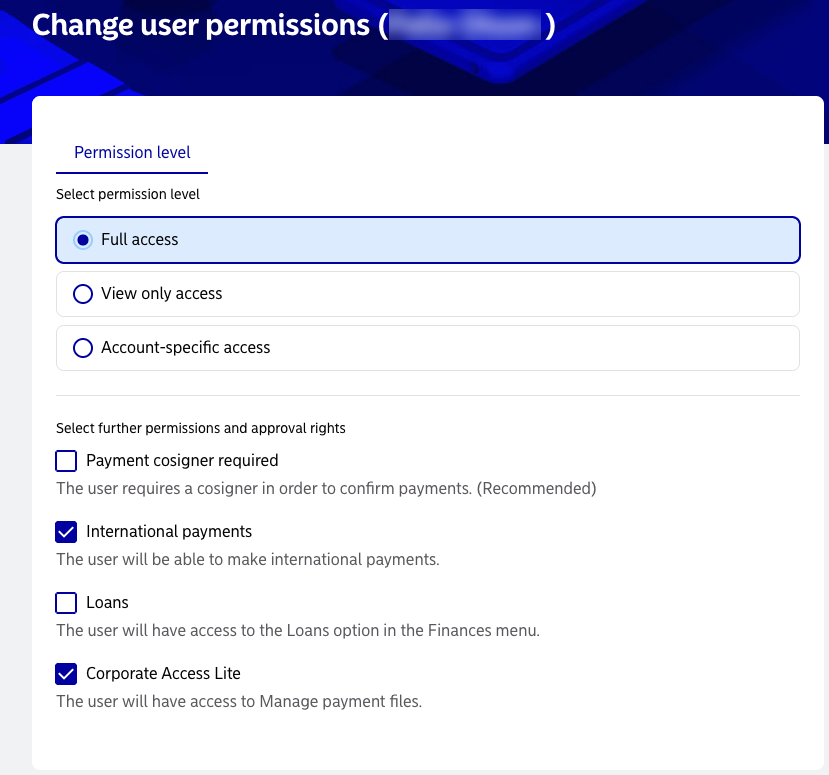
2. Click on a user and "Change user permissions".

3. Change the user's access. Full access is recommended. Corporate Access Lite is required for sending file payments.

Open payments Europe AB is a Payment Institute under the supervision of the Swedish Financial Supervisory Authority. Copyright © 2019 Open Payments Europe AB. Cookies